


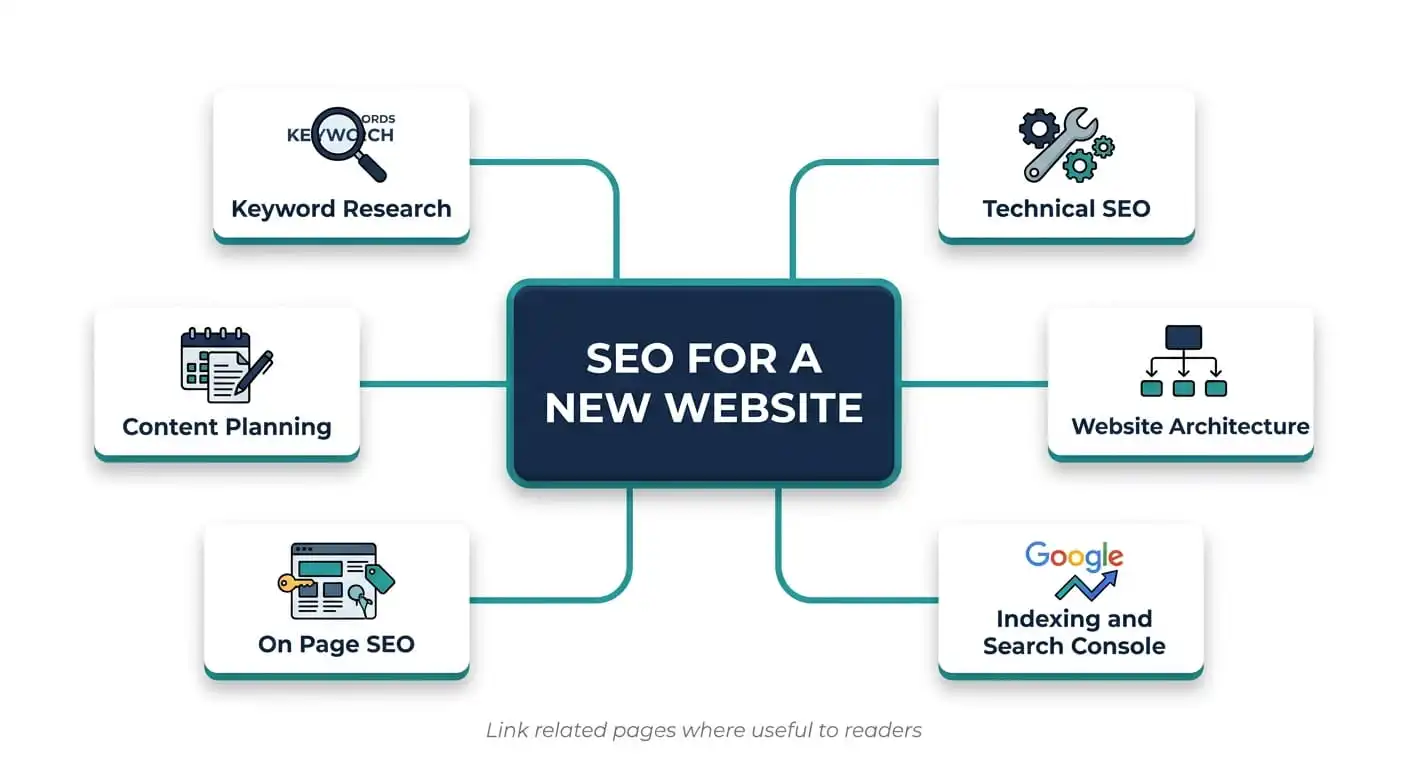
SEO for a new website comes down to five jobs, done in order. Make the site crawlable, connect it to Google Search Console, target keywords you can realistically win, optimize each page around a clear topic, and keep publishing useful content while you earn links and track results. Problems with the first two jobs are the most costly, because they block everything that follows.
This guide follows that order. You get a checklist to work through today, the reasoning behind each step, a troubleshooting guide for pages Google has not indexed, and a 90 day plan. No one can promise a first page ranking by a set date, so the plan focuses on milestones you can control and measure.
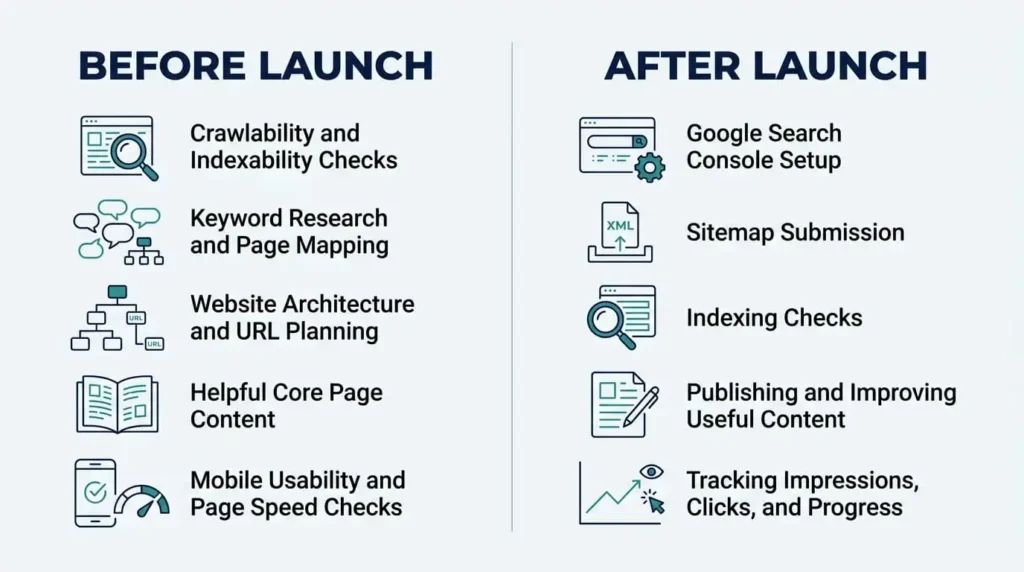
Use this as your working list. Each item is explained below.
Before launch
Launch week
First 90 days
Before launch, SEO is mostly about not creating problems. Fixing a poor URL structure or a stray noindex tag afterward is possible, but it costs time and sometimes traffic.
Pick a domain people can spell, remember and trust. A keyword in the domain is not a ranking shortcut, and a brandable name usually serves you better over the long term.
Plan your structure before building pages. Whether you are using custom website design for small businesses or building in-house, a simple hierarchy works for most companies: a homepage, a handful of service or product pages, supporting pages such as About and Contact, and a blog or resource section.
HTTPS is the baseline for any site today. Install the certificate, then make sure every alternate version of your address points to one preferred version through a permanent (301) redirect.
A canonical URL tells Google which version of a page is the main one when similar or duplicate versions exist. Filters, tracking parameters and printer versions commonly create duplicates. Most CMS platforms and SEO plugins add canonical tags that point to the page itself, so your job is mainly to verify they are correct.
This is one of the most common launch mistakes. Sites are often blocked from search engines while under construction, and the setting can travel with the site when it goes live.
Look for three things. First, a noindex directive on live pages, set either in a meta robots tag or in the HTTP response header. Second, a robots.txt file that disallows your whole site or key folders. Third, the “Discourage search engines from indexing this site” checkbox in WordPress, under Settings, then Reading.
One detail matters here. If robots.txt blocks a page, Google cannot crawl it, so it cannot see a noindex tag on that page either. Use robots.txt to manage crawling and noindex to keep a page out of results, and do not combine them on the same URL expecting both to work.
Draft these before launch instead of accepting what the CMS generates. For URLs, use short, lowercase words that describe the page, separated by hyphens rather than underscores or spaces. A path that names the service tells a reader and a crawler what to expect. A path made of a numeric ID tells them nothing.
A new domain has little history and few links, so it rarely competes with established sites for broad, high volume terms. The goal is to find topics where your site has a realistic chance and where the searcher’s need matches what you actually offer.
Start with people, not tools. List the problems your customers describe, the questions they ask before buying and the words they use, which often differ from industry vocabulary.
Then look at the intent behind each phrase. Informational searches (“how to check if a site is indexed”) want answers. Commercial searches (“best accounting software for freelancers”) want comparisons. Transactional searches (“book emergency plumber”) want to act. Give each page one clear purpose, but check the live results before deciding, because some queries have mixed intent and Google may show guides, product pages and local listings together. The results show you what Google believes searchers want.
Long tail keywords are longer, more specific phrases. Each has lower volume, but they face less competition and the searcher usually knows what they want, so they are where early traffic tends to come from.
Good sources include Google’s autocomplete and People Also Ask boxes, questions customers send you, the headings on competitor pages and, once your site has data, the Search Console query report. A tool such as Semrush, Ahrefs or Google Keyword Planner adds volume and difficulty estimates.
Advice often suggests targeting keywords with a difficulty score under 20. Treat that as a rough filter, not a rule, because every tool calculates difficulty differently and the same phrase can score quite differently from one tool to the next.
A better test is to read the results. If the first page is dominated by large publications, government sites and national brands, a new site is unlikely to break in soon. If smaller sites, thin pages or forum threads rank, there is room.
Weigh relevance and value alongside volume. A phrase searched 50 times a month by people ready to hire you can be worth more than one searched 5,000 times by people who will never buy.
Keyword mapping means assigning each important topic to one page, so your own pages do not compete with each other. Here is an example for a mobile truck repair company serving one city:
There is no fixed number of keywords per page. Choose one primary topic and let closely related phrases appear naturally. If two pages target the same topic, merge them or give each a distinct purpose.
On page SEO is the part you fully control, and small, consistent habits add up.
The title tag is the main clickable headline in search results. Put the primary topic near the front and make it specific. Google truncates by pixel width, not character count, so 50 to 60 characters is a useful guide, not a hard limit. “Emergency Truck Tire Repair in Montreal” works better than “Services.”
Meta descriptions do not directly influence rankings, but a clear summary of 150 to 160 characters can help people decide to click. Google often rewrites titles and descriptions to match the query, so a different result from what you wrote is normal.
Use one clear H1 that states the page’s main topic. HTML allows more than one, but a single H1 keeps the outline simple. Use H2s for major sections and H3s for details within them, so the headings read as an outline of the page. Headings help readers skim and give crawlers context, but there is no heading formula that ranks a page.
Put the answer or main point early. If the page targets a question, answer it in the first few sentences, then expand. Direct answers are also easier for featured snippets and AI Overviews to use.
Compress images before uploading, since oversized files are a common cause of slow pages. Write alt text that describes what the image shows, such as “mechanic replacing a rear tire on a semi trailer.” Repeating a keyword phrase there helps no one.
Internal links show Google how your pages relate and help visitors reach the page you want them to see. Link from supporting articles to the core page they support, and from core pages to relevant guides, using descriptive anchor text such as “fleet maintenance plan” instead of “click here.”
Link where it genuinely helps the reader, not to hit a quota. The practical goal is that no important page is orphaned, meaning nothing links to it.
Google finds most sites automatically by following links from pages it already knows. A new site with no inbound links can take a while to be found. You can speed that up, but it helps to be clear about what each stage means.
Discovery means Google knows a URL exists. Crawling means Googlebot visits it. Indexing means Google processes and stores the page so it can appear in results. Ranking is where it appears for a given search. A page can be crawled but not indexed, and indexed but not ranking anywhere useful.
Search Console is free and is the most direct channel between you and Google about your site. A domain property covers all subdomains and protocol variations but requires adding a DNS record. A URL prefix property is simpler to verify but covers only the exact address you enter.
Once verified, it shows which pages are indexed, which queries your site appears for and any problems Google found.
An XML sitemap lists the URLs you want Google to know about. Most CMS platforms and SEO plugins generate one at an address such as /sitemap.xml. Submit it under Sitemaps in Search Console.
A sitemap helps discovery, particularly for new sites with few inbound links. It does not guarantee indexing and does not improve rankings. Include only canonical, indexable pages, and leave out redirects, noindexed URLs and error pages. Google ignores priority and change frequency values, and an accurate last modified date is the only optional field that is useful.
The URL Inspection tool shows how Google sees a specific page: whether it is indexed, when it was last crawled and which canonical Google chose. According to Google’s URL Inspection tool documentation, you can also test the live page and request indexing to queue a crawl for your most important pages.
Use the request feature for your most important new or updated pages, not for bulk submission. It queues a crawl, but it does not force indexing.
To check quickly whether a page is indexed, search for site:yourdomain.com followed by the page address. It is a rough check, and Search Console gives the reliable answer.
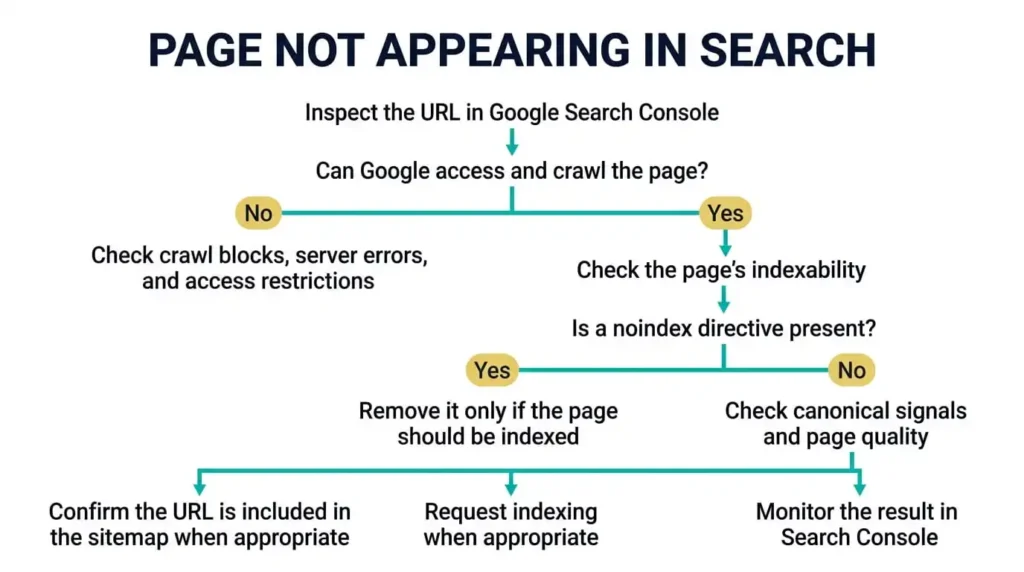
If your new website is not showing on Google, start with the Pages report in Search Console and match the status to the likely cause.
If key content only appears after heavy JavaScript runs, confirm in URL Inspection that Google sees it in the rendered page.
You do not need to be a developer, but a few technical basics decide whether your content gets a fair chance.
Mobile usability. Google indexes the mobile version of your pages, so the phone experience is the one that counts. Test key pages on a real phone and confirm that the mobile version contains the same important content as desktop.
Page speed and Core Web Vitals. These measure loading (Largest Contentful Paint), responsiveness (Interaction to Next Paint) and visual stability (Cumulative Layout Shift). Run key pages through PageSpeed Insights and fix the biggest causes first, which are usually oversized images, heavy plugins, slow hosting and render blocking scripts. A new site may show no real user data in Search Console at first because it takes enough traffic to report. Speed is one signal among many, so do not trade content quality for a perfect score.
Crawlable links. Googlebot follows standard HTML links with an href attribute. Navigation built entirely from scripts or buttons may not be followed reliably.
Duplicate URLs and redirects. Decide on one version of each address and redirect the rest permanently. When replacing an old site, map each old URL to its closest new equivalent instead of sending everything to the homepage.
Broken links. Check for 404 errors on internal links before launch and monthly afterward. Site crawlers and the audit features in Semrush or Ahrefs will find them.
Structured data. Schema markup such as Organization, LocalBusiness or Article gives search engines explicit context about a page. It is worth adding where it accurately matches visible content, but it is not required to rank. Validate it with Google’s Rich Results Test.

Publishing many pages does not mean ranking for many keywords. A smaller set of pages that fully answers real questions performs better than dozens written to catch every keyword variation.
Build in layers. Start with the core pages that carry commercial weight: the homepage, main service or product pages, About and Contact. Then add supporting articles that answer questions customers ask before they buy, and link each to the core page it supports.
This is the idea behind topic clusters: one central page covers a subject and related articles cover specific questions within it. For a small accounting firm, a core page on small business bookkeeping might be supported by articles on choosing bookkeeping software, which records to keep for tax season and how to separate personal and business expenses.
A few principles keep the content useful:
Publish on a rhythm you can sustain. One solid article every two weeks beats five rushed ones followed by months of silence.
For small business owners balancing daily operations with online growth, knowing what a digital marketing agency does for small businesses can help you decide whether to execute this checklist in-house or hire external support.
Links from relevant sites act as endorsements and help Google discover your pages. Content alone rarely carries a new domain, but how you earn links matters. Buying links or building them in bulk risks penalties and wastes money.
Legitimate approaches that suit small and new sites include:
Brand mentions without links still help people find you. Links remain a meaningful signal, but no fixed number of links produces a particular ranking, and a few relevant, editorially earned links generally outweigh many low quality ones.
If you serve customers in a specific area, implementing dedicated local SEO services runs alongside everything above and is often where new businesses win first.
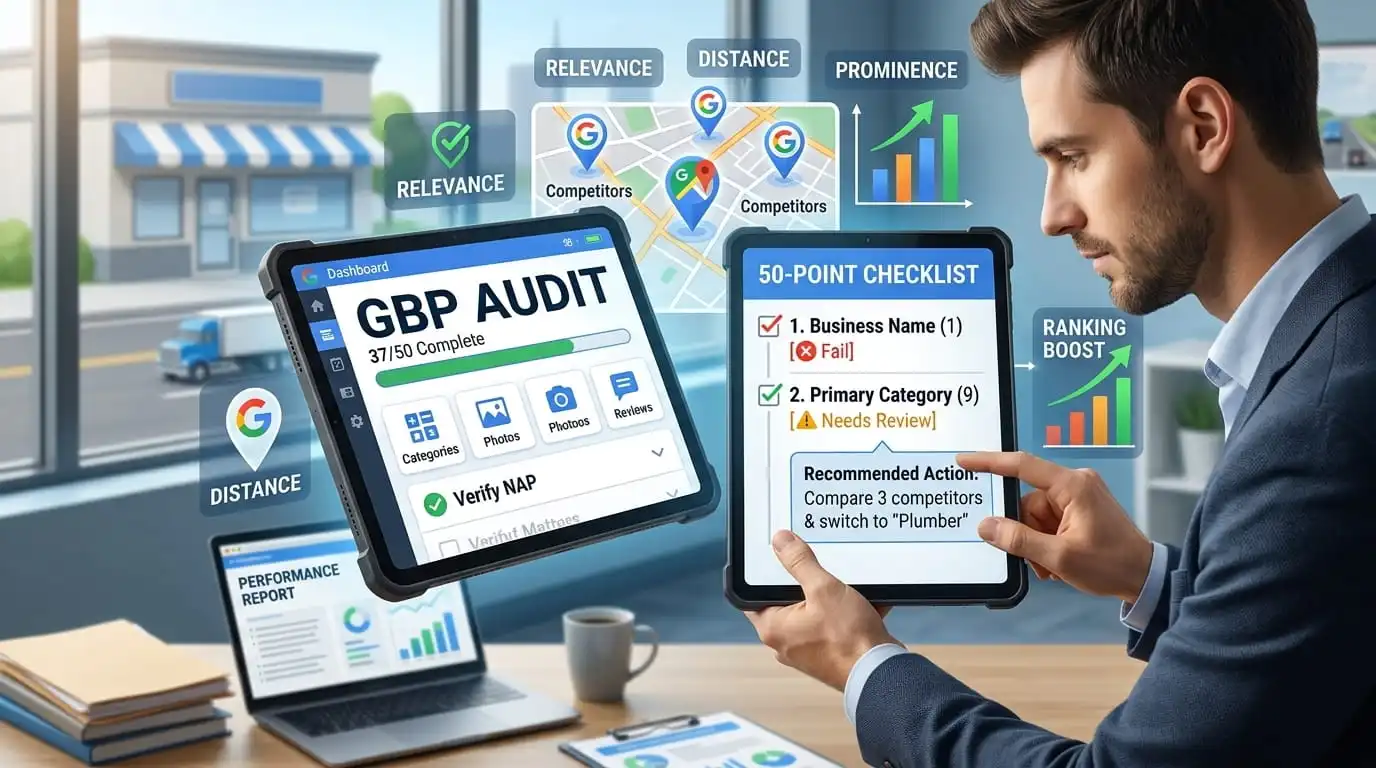
Claim and complete your Google Business Profile if your business is eligible, with accurate categories, services, hours, photos and a clear service area. To optimize your listing for local search results, follow our Google Business Profile audit checklist.
On your site, create a dedicated page for each distinct service. Add location pages only where you genuinely serve an area and can say something specific about it. Near identical pages with only the city name changed add little value. Encourage satisfied customers to leave reviews and respond to them, since review quality and recency influence local visibility.
Rankings are a lagging result. In the early weeks, the signals to watch are indexing, impressions and clicks. Indexing often takes days to a few weeks, sometimes longer, while meaningful organic traffic usually takes months and depends on competition, content quality, technical health and links.
Finish the launch checklist, then verify Search Console, submit the sitemap, set up analytics and conversion tracking and inspect your key pages. Fix anything flagged as blocked, noindexed or erroring before you start promoting the site.
Confirm that your core pages are indexed. Publish any core pages still missing, then the first supporting articles for your highest priority topic. Claim local profiles and submit the site to a few relevant, reputable directories.
Review Search Console weekly. At this stage you are looking for indexing problems, not traffic.
Search Console should now show impressions for some queries. Improve pages stuck as crawled but not indexed, and resolve the speed and mobile issues that PageSpeed Insights flags.
Add more supporting content to your main cluster, link it properly and begin outreach for links and mentions. If you need immediate traffic while waiting for organic rankings, combining organic efforts with targeted Google Ads management can capture search intent right away.
Study the queries your pages appear for. Pages with many impressions but few clicks may need a clearer title or a better match to the query. Pages ranking on the second page for a relevant query are often good candidates for improvement.
Decide what to expand, what to merge and what to leave alone, then plan the next quarter from the data.
Each metric answers a different question, so do not judge progress by one number.
Read them together. If pages are not indexed, fix indexing first. If pages are indexed but impressions stay very low, look at relevance and competition. If impressions are healthy but clicks are low, work on titles and how well the page matches the query. If clicks arrive but conversions do not, the issue is the page or the offer, not SEO.
Make sure the site is crawlable and indexable, connect Google Search Console and research keywords that match your services and suit a new domain. Optimize each page around a clear topic, publish helpful content, earn relevant links and monitor indexing and queries regularly.
Verify the site in Search Console, submit an XML sitemap, link your pages to each other and use URL Inspection to request indexing for key pages. Getting indexed is separate from ranking, which depends on relevance, quality and competition.
It varies. Indexing often happens within days to a few weeks, but steady traffic usually takes months and depends on competition, content quality, technical health and links. Anyone who guarantees a specific timeline or position is overstating what can be known.
Planning early prevents avoidable problems, though SEO can also be improved after launch. Before launching, remove noindex tags and staging restrictions, enable HTTPS with proper redirects, confirm key pages are crawlable, set unique titles and descriptions and prepare Search Console.
Common causes include that Google has not discovered the site yet, a noindex tag or robots.txt rule is blocking pages, or pages were crawled but not indexed. Check the Pages report in Search Console and use the troubleshooting list above.
Not to get indexed in most cases, though links often speed up discovery. Over time, relevant links help build authority, and quality matters far more than quantity.
There is no fixed number. Choose one primary topic per page and let closely related phrases appear naturally.
There is no ideal count. Build the pages needed to explain your real products, services and audience questions, and expand when you have something useful to add.
No. A sitemap helps Google discover pages, but Google still decides what to index based on quality, duplication and technical access.
Prioritize a clear, memorable, brandable domain. A keyword in the domain is not a shortcut to rankings.
Yes, much of it is manageable for a motivated beginner, including keyword research, page optimization, Search Console setup and content. Specialist help is useful for technical audits, site migrations, competitive markets and ongoing link building when you lack the time.
Start with free tools: Google Search Console, Google Analytics, PageSpeed Insights and Google Keyword Planner. Add a paid tool such as Semrush or Ahrefs when you need deeper keyword research or site audits.


Comments are closed